Chargeback control & management

We notify you when a dispute opens and help you respond on time. Step-by-step flow, reasons, and documentation are in the Resources guide.

Alerts & deadlines Dashboard & webhooks

Business team reviewing payments and disputes with security and traceability in Avirato Payments

Why treat it as a service

Less withheld funds

See disputed amounts and how they affect your settlement.

Deadlines under control

Know when each case expires and what documentation is required.

One thread per dispute

Reason, transaction, customer, and evidence tied to the original payment.

Prevention and learning

Reason patterns (fraud, service not received…) to improve checkout and policies.

From alert to response

Chargeback notification, case review, and evidence submission with team support.

  • Alerts when a case opens or updates
  • Documentation checklist by reason code
  • Tracking until resolution

Built into your payments

Same platform as POS, links, and online—the dispute maps to the transaction you already know.

  • Webhooks and API queries to automate
  • History in the merchant dashboard
  • Chargebacks guide in Resources (step-by-step process)

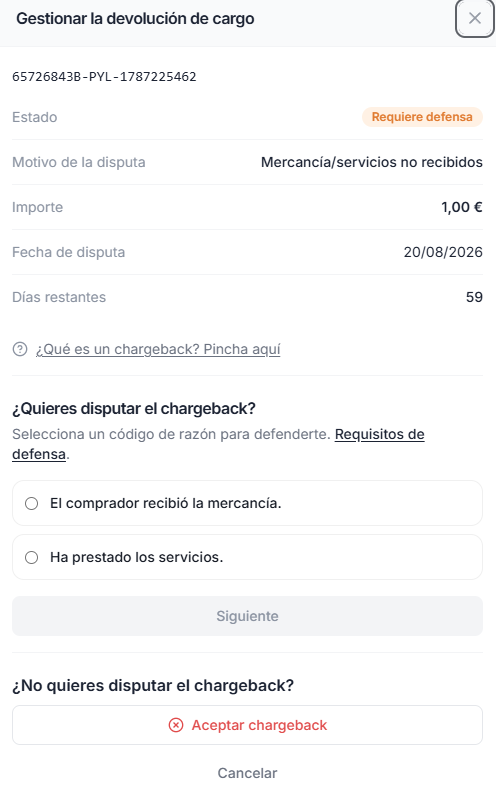
Defend disputes from the dashboard

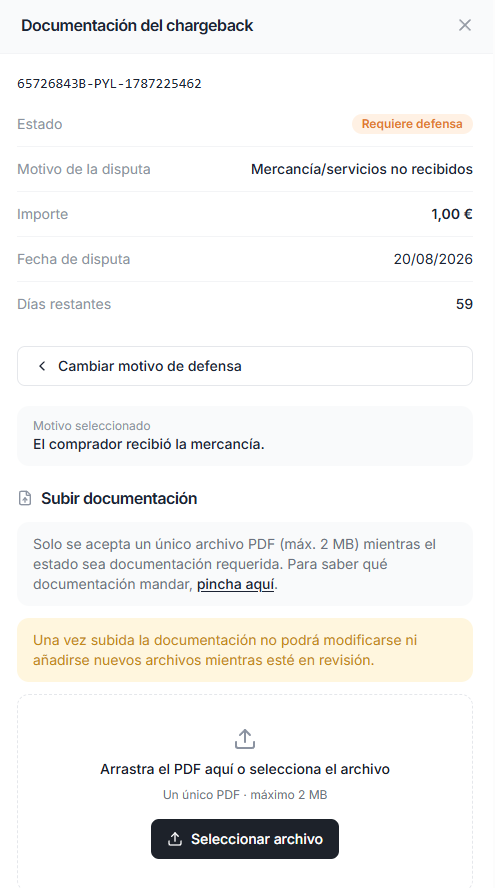
Choose whether to fight or accept, pick a defense reason, and upload a PDF with evidence before the deadline.

Modal to manage a chargeback: defense required, reason, and dispute options
Manage the chargeback Status, days remaining, dispute reason, and your response (defend or accept).
Modal to upload PDF documentation when defending a chargeback
Chargeback documentation Upload a single PDF (max. 2 MB) with the evidence required for your defense reason.

Dashboard visibility

Disputes alongside other transactions: amounts, statuses, and references for reconciliation.

  • Transactions flagged with dispute status
  • References to match your ERP or PMS
  • Aligned with chargeback webhooks
  • Same merchant login as the rest of the platform

Protect margin from disputes

Tell us your online volume and we will explain how to enable the service and response flow.

Contact sales